
 Table of Content

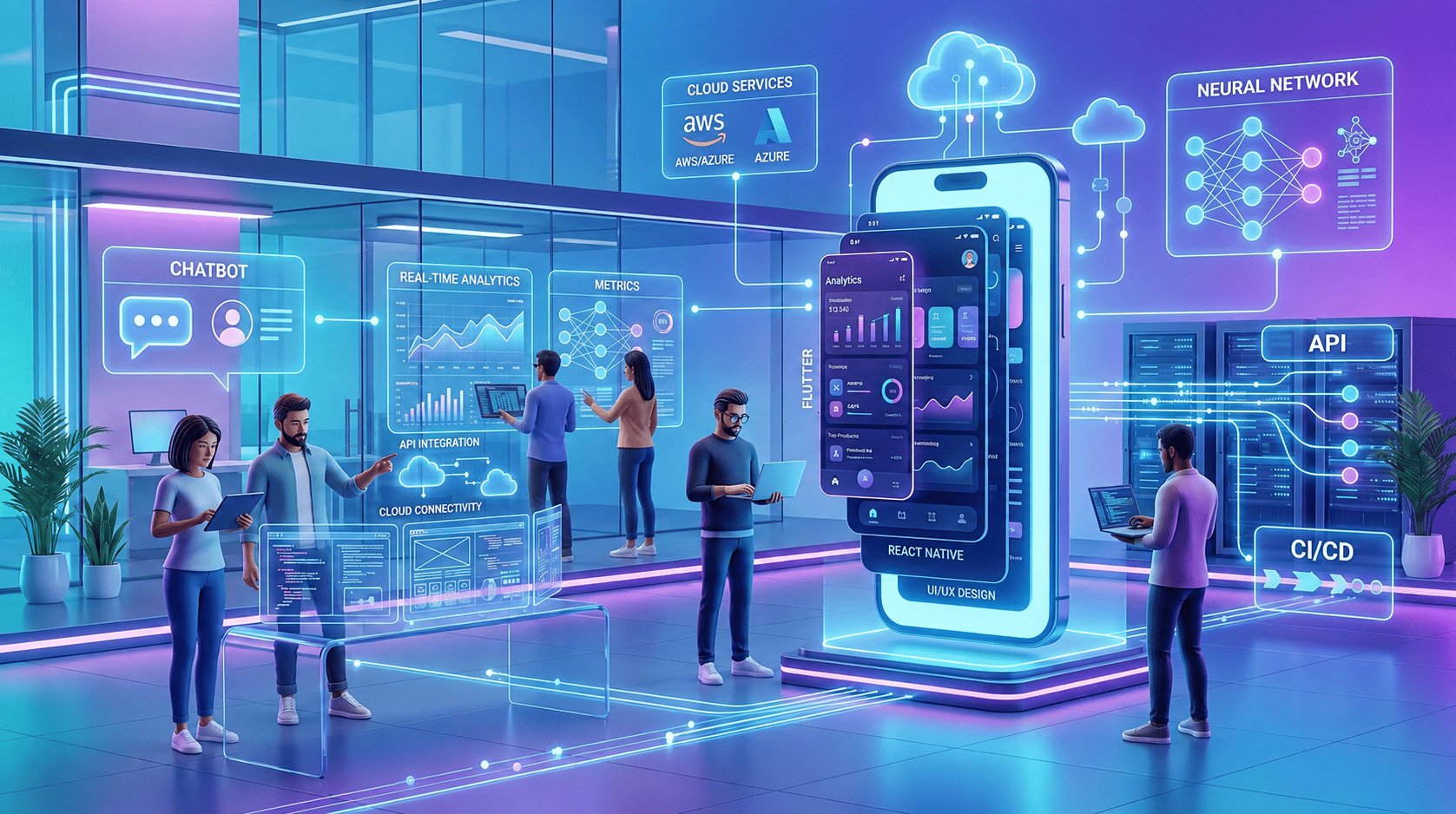
The last time mobile apps were just nice to have, iPhones were only three years old. But today, apps serve as the main channel of communication between businesses and their customers, employees, and business partners. The methods of developing mobile apps and what makes one better than another have changed significantly.
In 2026, mobile application development takes place on the verge of AI-driven design, mature cross-platform frameworks, and edge computing. Flutter has outpaced React Native in enterprise-grade applications. Artificial intelligence is not implemented in apps after the product is created, but is part of its architecture from the start. And companies that have been working with a minimum viable product for two years understand the price of technical debt.
This book has been written for decision-making purposes: to choose either a native or a cross-platform solution, to determine a development partner, to estimate your budget, and to distinguish when AI can really help.
What Is Mobile App Development?
Mobile app development refers to the creation of software applications for mobile platforms, such as iOS, Android, or both. The process involves various activities, including architecture selection, back-end systems integration, interface design, API integration, application optimization, and post-deployment maintenance.
What distinguishes mobile apps from web applications is much more than the display screen dimensions; they include the ability to run without Internet access, integration with built-in mobile device features (camera, GPS, touch screen, fingerprint scanning, push notifications), app store rules, operating system lifecycle, and finally, user expectation to be able to close your application within three seconds of waiting time.
Contemporary mobile app development also involves Progressive Web Apps (PWAs) and hybrid development, which combine web technologies and mobile technologies in many ways.
Types of Mobile Applications
Native Apps
Native apps are developed exclusively for a single platform, either Swift/Objective-C for iPhone or Kotlin/Java for Android.
The disadvantage of native apps is that they require two codebases and, consequently, two development teams (or one development team switching between different tasks), and their cost is significantly higher in the long run.
It is best for High-performance applications, AR/VR, hardware-intensive features, and apps where platform-specific UX matters deeply (like consumer finance or health apps with complex animations).
Hybrid Apps
Hybrid applications use codebases developed for the web within native containers via Capacitor and Cordova. Though they share code across various platforms, they usually compromise on speed and performance because they may feel strange, especially during complex tasks.
It was easier to understand Hybrid apps in 2015. In 2026, most teams that would have opted for Hybrid apps will already be working on cross-platform frameworks.
Cross-Platform Apps
There are cross-platform frameworks such as Flutter and React Native, where the same code can be compiled into native or almost native code on both iOS and Android. Performance has increased tremendously with frameworks such as Flutter's Impeller rendering engine, almost reaching native performance levels for all common use cases.
This is where most of the mobile development market has moved. 70%+ of new business app projects today start with Flutter or React Native.
Many businesses now hire experienced, dedicated mobile app developers to accelerate delivery timelines while maintaining consistent app performance across Android and iOS.
Progressive Web Apps (PWAs)
PWAs are basically web applications with mobile application-like capabilities. They can be installed on the home screen of your device, can function without internet, receive push notifications, and load quickly. They can be used directly in browsers; hence, there is no need to distribute through app stores, which leads to quicker development cycles and lower costs.
Disadvantages of PWAs: Limited access to device APIs, limited compatibility with iOS (improved now), and inability to match the performance of native apps.
It is suitable for Applications with lots of content, e-commerce, enterprise use cases, and markets where app store downloads are difficult to obtain.
PWAs are also commonly used in web development projects where businesses want app-like experiences without requiring users to download apps from the Google Play Store or Apple App Store.
Native vs Cross-Platform vs Hybrid App Development
This decision shapes your entire project. Here's a practical comparison:
| Factor | Native | Cross-Platform | Hybrid (PWA/Capacitor) |
| Performance | Highest | Near-native (Flutter) / Good (RN) | Lower |
| Development cost | High (two codebases) | Medium | Low-Medium |
| Time to market | Slower | Faster | Fastest |
| UI/UX fidelity | Best | Very good | Acceptable |
| Device API access | Full | Good (most APIs) | Limited |
| Team expertise needed | iOS + Android specialists | Flutter/RN generalists | Web developers |
| Long-term maintenance | Harder (two codebases) | Easier (one codebase) | Easiest |
| App store distribution | Yes | Yes | No (PWA) |
| Offline capability | Full | Full | Partial |
| Enterprise adoption | High (legacy) | Growing fast | Limited |
Performance Comparison
For most business applications, dashboards, e-commerce, service apps, and internal tools, cross-platform performance is indistinguishable from native to end users. The gap only becomes meaningful for:
- Complex 3D graphics or gaming
- Real-time video processing
- Apps that heavily use platform-specific animations and gestures
- Augmented reality with high frame rate requirements
Scalability and Maintenance
Here, cross-platform really earns its place. A single codebase means bug fixes, feature releases, and Operating System compatibility updates happen once, not twice. For a growing startup or a company with a lean engineering team, that's a meaningful operational advantage.
Native makes sense when you have the team size to support it, and the product requirements demand platform-specific capabilities you can't get elsewhere.
Mobile App Development Process
Every successful app development project starts with understanding the target audience, defining measurable KPIs, and identifying the core business problem the application should solve.
A good mobile app development process isn't linear; it's iterative. Here's how experienced teams actually approach it:
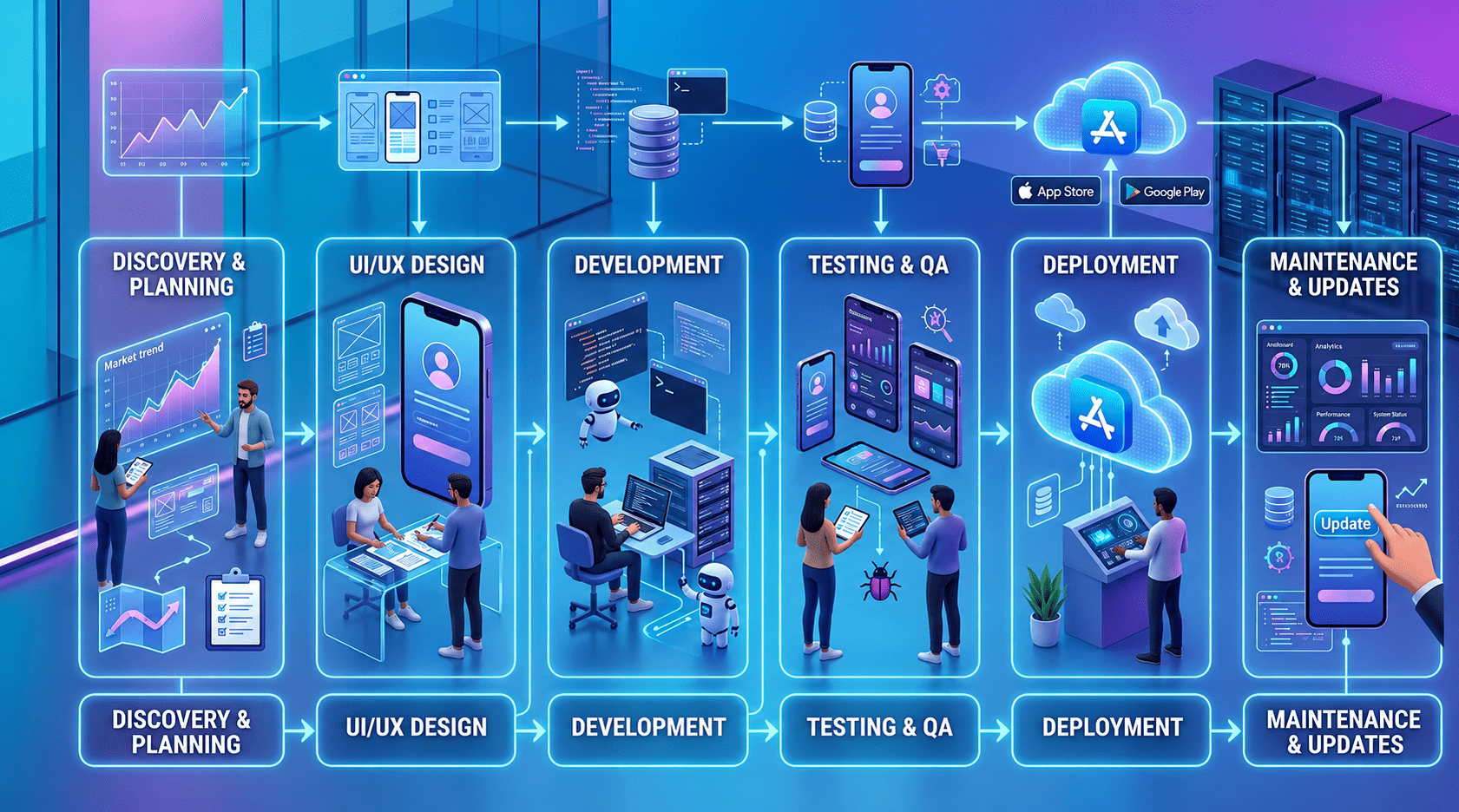
Phase 1: Discovery and Requirements
This phase gets cut short more often than any other, and it's usually why projects fail. Discovery should produce:
- A validated problem statement (not just feature lists)
- User personas and key user journeys
- Technical feasibility assessment
- Platform decision (iOS, Android, or both)
- Architecture planning (backend services, APIs, data models)
- Scope definition with MVP boundaries clearly drawn
Budget at least 2-4 weeks for this on any serious project. Skipping it means you're paying to build the wrong thing faster.
Phase 2: UI/UX Design
In 2026, design is highly prototypal. Designers work with Figma to make interactive prototypes that users can test without even writing one line of code. It helps designers identify issues early in the process, which reduces costs for resolving any UX issues.
Outputs: Wireframe, High-fidelity mockup, Interactive prototype, Design system, Accessibility compliance check.
Pro-tip: The design system is more important than individual screen designs. A library of components helps you save time during development and iteration processes.
Phase 3: Architecture and Backend Development
This is where long-term scalability decisions get made. Key questions:
- Monolith vs microservices?
- Which Cloud provider (AWS, GCP, Azure)?
- REST vs GraphQL vs gRPC?
- Authentication approach (OAuth2, JWT, biometric)?
- Real-time requirements (WebSockets, push notifications)?
- Data storage and synchronization strategy?
Decisions made here are expensive to reverse. A startup building an MVP might use Firebase for speed; an enterprise that does the same might spend a year migrating off it later.
Phase 4: Frontend Development
This is where your framework choice plays out. Good frontend development means:
- Component-based architecture for reusability
- State management that scales (Riverpod for Flutter, Redux Toolkit, or Zustand for React Native)
- Performance optimization from the start (lazy loading, image caching, efficient list rendering)
- Accessibility built in, not bolted on
Experienced teams focus heavily on scalable architecture because a successful app must maintain performance, usability, and reliability even as the user base grows.
Phase 5: Quality Assurance
Testing on mobile is harder than on the web. Real-device testing matters; emulators don't catch everything. A proper QA process includes:
- Unit and widget testing
- Integration testing
- Performance testing under real network conditions (3G, 4G)
- Device fragmentation testing (especially important on Android)
- Beta testing with real users via TestFlight or Firebase App Distribution
Phase 6: Deployment and App Store Submission
Both Apple App Store and Google Play have review processes. Apple's budget is stricter and less predictable, 1-2 weeks for the first submission and potential rejections. Google is faster but still has quality requirements.
CI/CD pipelines (Fastlane, Codemagic, Bitrise) automate build and deployment. Any team shipping more than once a month should have this set up.
Phase 7: Post-Launch Maintenance
Apps don't stop needing work after launch. Every iOS and Android major release requires compatibility testing and often code updates. Crash monitoring (Sentry, Firebase Crashlytics), analytics, and user feedback loops should be live from day one.
Budget 15-20% of your initial development cost annually for maintenance.
Best Mobile App Development Frameworks in 2026
Flutter
Flutter is a cross-platform framework by Google that utilizes the Dart programming language. Flutter compiles directly into native ARM instructions and has its own rendering engine called Impeller; hence, there is no dependency on any particular user interface elements from the host platforms (iOS and Android).
Use Flutter when you need high visual fidelity, when you're building for multiple platforms (mobile, web, desktop) from one codebase, or when you're starting a new project without legacy code dependencies.
Don't use Flutter when: Your team is deeply invested in JavaScript, and a React Native migration path is more practical, or you need very specific native modules that don't have Flutter equivalents yet.
React Native
React Native, managed by Meta, provides a framework for JavaScript developers to develop applications using React. Instead of creating new views, it connects to native components, which means better platform compatibility, though that’s also where most of its performance issues arise.
The recently released New Architecture (Fabric + TurboModules) has greatly enhanced the performance. For companies that have developed web applications with React, React Native makes context switching cheaper.
Use React Native when your team has strong JavaScript/React expertise, when you're building a relatively standard UI (not heavy on custom animations), or when you're sharing business logic between web and mobile.
Don't use React Native when you need complex custom animations, your app is compute-intensive, or you're hitting many native module bridge limitations.
Swift (iOS Native)
Swift is the native language when developing for iOS and macOS. It provides great tooling support in Xcode, good ecosystem integration, and gives early access to all iOS features. For commercial apps that need iOS functionality and a polished user experience, Swift-native code is still a good option.
Kotlin (Android Native)
Kotlin is Google's preferred language for Android development, expressive, null-safe, and interoperable with Java. Kotlin Multiplatform (KMP) is gaining traction as a way to share business logic across platforms while keeping platform-specific UIs native.
Ionic
Ionic is a hybrid framework that uses web technologies like HTML, CSS, and JavaScript, along with Capacitor, to access native device features. It is recommended for building internal tools and basic applications, or when you have developers who know how to build web apps but don’t have a lot of money to spend.
Flutter vs React Native: The Real Comparison
This is the most common framework decision for new projects in 2026.
| Factor | Flutter | React Native |
| Language | Dart | JavaScript/TypeScript |
| Rendering | Custom (Impeller) | Native bridge to platform UI |
| Performance | Excellent | Good (improved with New Architecture) |
| UI consistency | Pixel-perfect across platforms | Platform-native feel |
| Learning curve | Medium (Dart learning required) | Lower (for JS developers) |
| Package ecosystem | Growing, strong for common needs | Larger, more mature |
| Hot reload | Fast and reliable | Fast, occasional issues |
| Web support | Yes (experimental → production-ready) | Limited |
| Desktop support | Yes (macOS, Windows, Linux) | Limited |
| Enterprise adoption | Growing fast | Established |
| Google support | Strong | Meta-backed, community |
For startups: Flutter's faster iteration cycle and better performance make it the default recommendation for new consumer apps. The Dart learning curve is real but short.
For enterprises: React Native has an edge if your organization already has JavaScript teams. Flutter wins if you're building a design-heavy product or need multi-platform (mobile + desktop + web) from a single codebase.
The honest take: Flutter has won the performance argument. React Native wins the ecosystem and talent availability argument in JavaScript-heavy organizations. Neither is wrong; the best choice depends on your team's skills and your app's requirements.
Mobile App Development Cost in 2026
Cost is the question everyone asks, and nobody answers honestly. Here's a realistic breakdown.
Factors That Drive Cost
- Complexity: A simple CRUD app with 5 screens costs fundamentally less than a platform with real-time sync, payments, AI features, and third-party integrations.
- Platform(s): iOS + Android costs more than one platform. Cross-platform frameworks reduce this delta but don't eliminate it.
- Backend requirements: Apps with complex backend logic (custom APIs, microservices, real-time features) cost 2-3x more than apps using BaaS like Firebase.
- Design quality: A polished, custom-designed app costs more than one that uses stock components.
- Team location: Rates vary significantly by geography.
- Compliance requirements: HIPAA, GDPR, and PCI-DSS compliance add cost in both development and infrastructure.
Realistic Cost Ranges (2026)
| App Type | Estimated Cost | Timeline |
| Simple MVP (5-10 screens, basic backend) | $15,000-$40,000 | 2-4 months |
| Mid-complexity app (20+ screens, custom API) | $40,000-$120,000 | 4-8 months |
| Complex consumer app (social, marketplace) | $100,000-$300,000+ | 8-18 months |
| Enterprise app (integrations, compliance, scale) | $200,000-$1M+ | 12-24 months |
These ranges assume a competent team. Offshore teams at the cheap end exist but come with coordination overhead, quality risk, and revision cycles that often erode the cost savings.
Hidden Costs Teams Ignore
- Third-party APIs and services: Maps, payments, SMS, analytics, push notifications, these add up monthly.
- App store fees: Apple charges $99/year; Google charges $25 one-time. Enterprise distribution has different costs.
- Ongoing maintenance: OS updates, bug fixes, security patches, dependency updates.
- Infrastructure: Backend hosting, CDN, databases, monitoring, often $500-$5,000/month depending on scale.
- Design iterations: Users and stakeholders will request changes post-launch.
MVP vs Enterprise App Philosophy
An MVP should validate assumptions, not impress investors with polish. The best MVPs do one thing extremely well. The worst is to ship every feature on the roadmap in version one.
Build an MVP to learn. Build an enterprise app to scale. Don't confuse the two, and don't build an enterprise app when you need an MVP.
AI in Mobile App Development
AI is reshaping mobile development projects in two distinct ways: what apps can do, and how apps get built.
AI-Powered App Features
Personalization at scale: Recommendation engines, dynamic content ordering, and personalized push notifications based on behavior patterns. This isn't new, but LLM-based personalization has made it dramatically more accessible.
On-device AI with Core ML and TensorFlow Lite: Run models directly on the device, with no network calls required, enabling real-time image recognition, voice processing, and language understanding without latency or privacy concerns. Apple's Core ML and Google's ML Kit have made this practical for most development teams.
AI chatbots and conversational interfaces: GPT-4o and Claude integration into apps via API is now a two-day integration, not a six-month project. The challenge is building conversational experiences that are actually useful rather than just technically impressive.
Predictive analytics: Apps that surface what the user is likely to need before they ask, predictive search, next-action suggestions, and anomaly detection in user behavior.
Computer vision: Document scanning, barcode reading, object recognition, and AR overlays are increasingly common in business apps (logistics, field service, retail).
AI-Assisted Development
GitHub Copilot, Cursor, and other such platforms have made coding easier for developers. It is now much quicker to generate boilerplate code, write tests, and document the software.
Low-code and no-code solutions (FlutterFlow, Adalo, Bravo Studio) make it possible for anyone to build simple applications. However, their capabilities are quickly reached, and anything past that needs experienced programmers.
Realistic view of what will happen by 2026: AI tools save 20-40% development time for common features. They cannot think about architecture, user experience design, or debugging of complex integrations.
Enterprise Mobile App Development Challenges
Building a mobile app for 1,000 enterprise employees is fundamentally a different problem than building a consumer app for 10,000 retail customers.
Scalability
Enterprise apps often need to handle spikes in usage (morning login floods, end-of-month reporting), work reliably on corporate networks with security restrictions, and scale as the organization grows. Architecture decisions that work at 500 users often break at 50,000.
Security
Enterprise apps touch sensitive data. Requirements typically include:
- Single Sign-On (SSO) via SAML or OIDC
- Certificate pinning to prevent man-in-the-middle attacks
- Remote wipe capability
- Jailbreak/root detection
- Encrypted local storage
- Mobile Device Management (MDM) compatibility
Third-Party Integrations
Enterprise apps rarely stand alone. They connect to ERP systems (SAP, Oracle), CRM platforms (Salesforce), HR systems, payment processors, and internal APIs, many of which are legacy systems with poorly documented interfaces. Integration work frequently takes longer than the app itself.
Compliance
Regulated industries have non-negotiable requirements:
- Healthcare: HIPAA compliance, audit logging, minimum necessary access
- Finance: PCI-DSS, SOC 2, transaction logging
- EU operations: GDPR data residency, right to erasure, consent management
- Government: FedRAMP, FISMA (US), or equivalent
Compliance adds cost and time. Budget for it explicitly.
Performance Under Real Conditions
Enterprise users are often in the field, in warehouses, hospitals, and construction sites, on spotty networks. Apps need robust offline capability, efficient sync strategies, and graceful degradation when connectivity drops.
Mobile App Security Best Practices
Security is not a feature to add at the end. These practices should be built into the architecture from day one.
Authentication
- Implement OAuth 2.0 with PKCE for secure authorization flows
- Use biometric authentication (Face ID, fingerprint) as a second factor, not a replacement for strong primary auth
- Short-lived access tokens with refresh token rotation
- Account lockout after failed attempts
API Security
- All API calls over HTTPS/TLS 1.3
- Certificate pinning for high-security applications
- API rate limiting to prevent abuse
- Input validation on both client and server
- Never expose sensitive API keys in the client bundle
Data Encryption
- Encrypt sensitive data at rest using platform-native secure storage (iOS Keychain, Android Keystore)
- Encrypt data in transit
- Don't store sensitive data in plain text files, shared preferences, or logs
Data Privacy
- Collect only what you actually need (data minimization)
- Clear privacy policy and consent flows
- Implement user data export and deletion for GDPR/CCPA compliance
- Anonymize analytics data where possible
OWASP Mobile Top 10
OWASP Mobile Application Security Verification Standard (MASVS) is the official checklist for mobile application security verification. Points include: Insecure data storage, insecure communications, incorrect authentication, weak cryptography, insecure authorization, client-side code quality, code obfuscation, and reverse engineering prevention.
All enterprise-grade apps need to be subject to a security verification process according to OWASP standards before release.
Mobile App Development Trends 2026
AI-Native App Architecture
The difference between an "AI-powered" app and an "AI-native" app is architectural. AI-native apps are designed from the ground up with intelligence at the core, not as a feature added later. This means embedding model inference into the UX flow, using vector databases for personalization, and designing for iterative learning from user behavior.
Edge Computing in Mobile
By executing computations at the edge, on the device itself, or on adjacent edge servers, one can minimize latency, reduce Google Cloud Platform expenses, and handle privacy issues. Edge computing becomes feasible with the help of technologies like Apple's Neural Engine and Google's Tensor processor.
Super Apps
The concept of super apps, where a single application provides solutions for payments, shopping, messaging, and services, which ruled Asia, has gradually started making its way into Western countries. WhatsApp Business and Uber are some examples. On the B2B front, this corresponds to creating platforms that bundle tasks performed by several applications.
AR/VR and Spatial Computing
The Apple Vision Pro and future generations have revitalized interest in spatial computing for enterprises. Use cases include field service with AR instructions, retail with virtual try-on, simulations, and remote expert guidance. Development will always need some specializations, but platform development maturity is making progress.
Low-Code/No-Code for Internal Tools
Every mobile application doesn't require the expertise of an experienced software engineer. Internal apps, expense management, stock management, and field data collection are gradually being developed using low-code platforms by citizen developers, thereby freeing engineers to focus on customer-centric applications. The boundary between requiring development and not requiring it has blurred.
Blockchain and Decentralized Features
Applications like supply chain certification, digital credentials, and loyalty tokens are viable blockchain applications in mobile. Not all mobile applications require blockchain technology, but there are certain cases (inter-organizational data exchange, provenance, digital ownership) where it actually addresses the issue.
How to Choose a Mobile App Development Company
The development partner you choose will determine whether you get a product or a prototype, a partnership or a vendor relationship.
Evaluation Framework
1. Portfolio depth, not breadth. Look for apps that solve problems similar to yours, in the same industry, with the same level of complexity, and for the same user type. A company that's built 50 simple e-commerce apps may not be the right choice for a complex fintech platform.
2. Technical stack alignment. Do they specialize in Flutter? React Native? Native? Make sure their expertise matches your project's requirements. A company that "does everything" often means they do some things poorly.
3. Process transparency. How do they handle scope changes? What does their QA process look like? Do they provide access to project management tools? Vague answers here are red flags.
4. Communication structure. Who is your point of contact? Is it a dedicated project manager, or does communication go through sales? How often do you get status updates?
5. Post-launch support. What happens after the app launches? What's their response time for critical bugs? Do they have a maintenance retainer model?
Reliable Reviews of Mobile App Development Companies
Finding trustworthy reviews can prevent costly mistakes. Consider these approaches:
- Clutch.co & GoodFirms - Aggregates verified client reviews and ranks companies by expertise and industry focus.
- Case Studies & Portfolios - Evaluate companies based on similar projects they’ve completed, not just star ratings.
- LinkedIn Recommendations -Look for testimonials from past clients and employees.
- Referrals from Industry Peers - Direct recommendations often reveal project management style and reliability.
- Check App Stores - If the company has published apps publicly, reviews and ratings provide insight into real-world quality.
Questions to Ask Before Signing
- Can you show me a specific example where a project scope changed significantly? How did you handle it?
- What does your QA process look like? Do you do manual testing, automated testing, or both?
- How do you handle OS updates (iOS/Android major releases)?
- What's your experience with App Store submission and rejection handling?
- Who owns the source code, us, or you?
- How do you ensure knowledge transfer if we want to bring development in-house later?
Red Flags
- Giving a fixed quote before fully understanding the requirements
- No questions about your business goals, just technical requirements
- Can't point to specific senior developers who would work on your project
- No clear IP ownership clause in the contract
- Reluctance to provide client references
- "We can build anything" without specialized evidence
Outsourcing vs In-House
If time is of the essence, there is limited capacity for recruitment within the organization, or certain skills are needed temporarily, outsourcing is the answer.
Alternatively, bringing talent in-house is better if the nature of your work depends heavily on mobile devices, constant iterations and changes are expected, or competitive differentiation requires extensive knowledge of organizational processes.
It happens that organizations go through both outsourcing and in-house phases, starting with outsourcing and moving to in-house talent later on.
Looking to build scalable, AI-ready mobile applications? Avidclan Technologies helps startups and enterprises develop high-performance mobile apps using Flutter, React Native, and modern cloud technologies.
RELATED SERVICES

Don’t miss out – share this now!

Link copied!
.svg)
 (1) (1).svg)
.svg)

Rushil Bhuptani
FREQUENTLY ASKED QUESTIONS (FAQs)

To revolutionize your business with digital innovation.
Let's connect!
